Move any server to Canada. Keep it running while you do.
One command on the source VPS, wherever it is hosted. We copy the disks over an outbound tunnel, keep syncing the changes, and cut over when you say so — with a health check and a way back.
How it is different
Built for the migration you actually have
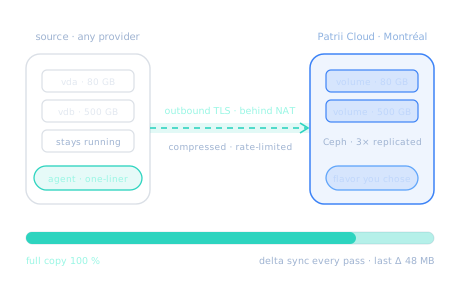
Block-level copy, over a tunnel the source opens
The agent reads the source disks live — no reboot, no downtime — and streams them, compressed and rate-limited if you ask, to volumes on Ceph in Montréal. Pick which disks come along; the first one is the boot disk.
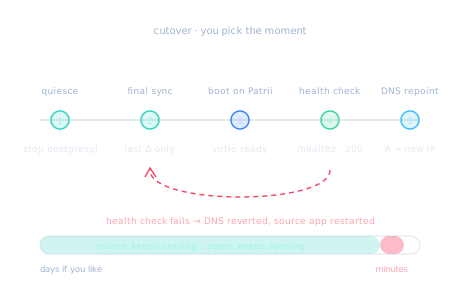
Minutes of downtime, on the day you choose
When the full copy is done the migration sits in a syncing state for as long as you need. Trigger the cutover and the agent runs your quiesce command, sends the last delta, boots the instance on Patrii and polls your health-check URL — then repoints the DNS records you listed.
- Quiesce — a command on the source before the final sync, for a consistent copy.
- Health check — a URL polled after boot; failure fails the migration.
- Rollback — DNS reverted and the source application restarted, automatically.
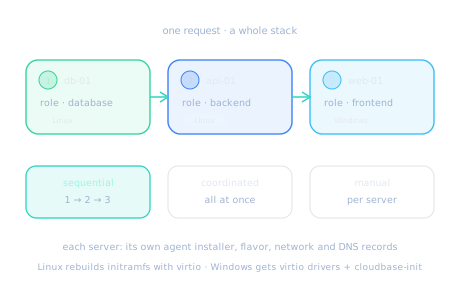
Database, API, frontend — moved as one
Describe every server of a stack in one request, each with its role, flavor, network and DNS records. One installer per source, one progress view for the whole group, and three ways to cut over so the database lands before the services that depend on it.
Four steps, one of them yours
Describe the target
Name the migration, give the source's public IP, pick a flavor, a network and an SSH key, and choose how the agent connects.
Run the one-liner
Paste the generated installer on the source as root. It installs the agent and the full copy starts on its own.
Let it sync
Watch the passes and the last delta in the console. The source keeps serving; you pick the moment.
Cut over
Quiesce, final sync, boot, health check, DNS. If anything fails, the rollback puts the source back in charge.
Guest operating systems